
Xbox Kinect Adapter for Xbox One S and Windows 10 PC
Experience the convenience and versatility of the Xbox One Kinect Sensor on your Xbox One S or Windows PC. Whether you want to navigate your new console without lifting a finger or develop interactive apps on your PC, the Kinect Adapter makes it happen.
Valid for the Xbox One S consoles only. Not for use with other Xbox consoles.
How to set up the Kinect Adapter with an Xbox One S console
Step 1: Set up the adapter
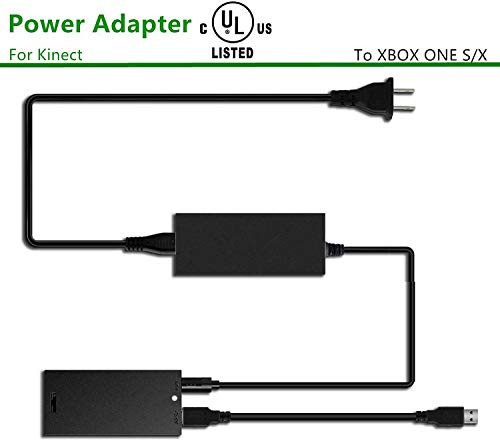
1.Plug the wall plug into the power supply.
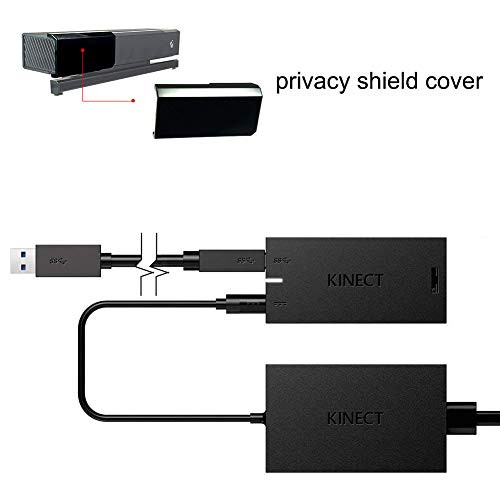
2. Insert the round connector of the power supply into the Kinect hub.
3. Insert the Kinect sensor cable into the Kinect hub.
4. Insert the included USB cable into the Kinect hub.
5. You're now ready to connect the adapter to your console.
Step 2: Connect the adapter to the Xbox One S console
1. Insert the USB 3.0 cable into the left USB port labeled 'Kinect' on the back of the console. Your Kinect sensor is now ready to be set up on your console.
2. For best practice, make sure your Kinect sensor and Kinect Adapter are not sitting directly on top of your console.
3. On your console, scroll left to the Guide and select Settings.
4. Select All settings and scroll down to Kinect & devices.
5. Select Kinect and follow the instructions to set up your sensor.

Samtech Xbox Kinect Adapter, Kinect Adapter for Xbox One, Xbox One X, Xbox One S and Windows 10 PC, kinect 2.0 Sensor Adapter with USB 3.0
Was:
$115.98
Now:
$57.99
(No reviews yet)
Write a Review
Write a Review
Samtech Xbox Kinect Adapter, Kinect Adapter for Xbox One, Xbox One X, Xbox One S and Windows 10 PC, kinect 2.0 Sensor Adapter with USB 3.0
- SKU:
- FF60155
- UPC:
- 8431227385489
- Condition:
- New
- Availability:
- Free Shipping from the USA. Estimated 2-4 days delivery.

Xbox One Kinect Adapter for Windows 10 PC,Xbox One S and Xbox One X kinect 2.0 Sensor
Was:
$115.98
Now:
$57.99
![Kinect Adapter for Xbox One S Xbox One X Windows PC [UL Listed] Xbox Kinect Adapter Power Supply for Xbox 1S 1X Kinect 2.0 Sensor, Xbox One Kinect Adapter for PC Windows 10 8.1 8](https://cdn11.bigcommerce.com/s-t8bvbs505h/images/stencil/500x659/products/3388455/3655180/51CmhRlzhnL__70861.1566124797.jpg?c=2 "Kinect Adapter for Xbox One S Xbox One X Windows PC [UL Listed] Xbox Kinect Adapter Power Supply for Xbox 1S 1X Kinect 2.0 Sensor, Xbox One Kinect Adapter for PC Windows 10 8.1 8")

