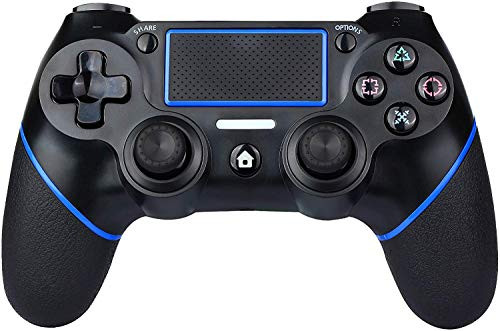
![PS4 Controller Wireless Gamepad, [Upgraded Version] for Playstation 4/Pro/Slim/PC(7/8/8.1/10), Touch Panel Gamepad with Dual Vibration and Audio Function Anti-Slip Grip, Mini LED Indicator](https://cdn11.bigcommerce.com/s-t8bvbs505h/images/stencil/1280x1280/products/5949893/6300367/51d714JpikL__46299.1599071047.jpg?c=2 "PS4 Controller Wireless Gamepad, [Upgraded Version] for Playstation 4/Pro/Slim/PC(7/8/8.1/10), Touch Panel Gamepad with Dual Vibration and Audio Function Anti-Slip Grip, Mini LED Indicator")
How to connect?
1. Connect the controller to PS4:
? Plug the USB cable into PS4 console and this controller.
? Press the HOME button to make the LED light bar flash.
? When the light bar is always on, the connection is always on.
2.Connect the controller to PC :
?The controller can be connected to a PC via a USB cable and used
as a wired controller. The driver is automatically installed when
you connect it to your PC(Windows 7/8/8.1/10) for the first time.
What equipment is suitable for?
Compatible with PS4 / PS4Pro / PS4Slim / PC (Windows7/8/8.1/10).
Also applies to the latest PS4 system software version 5.55. It can
be used as a wired controller when connected to a computer via a USB cable.
Notes:
? If somethings wrong with the product, it can be reset.
How to reset: Please stab the switch in the small hole on the back of
the product and re-pair with the host to check if it is normal.
? If you can not connect to PS4, please use the cable included in the
package instead of the original cable,delete the name of the Bluetooth
installed in the PS4, and try again.
? When you need to use headphones, please use Sony original
headphones. Additionally, when using headphones for the first time,
you need to open the game homepage and set up according
to the following procedure: Settings> Peripherals> Audio Equipment> Output to Headphones>
Turn on all audio output.
Specifications:
Size: 16.5 x 11.5 x 7.5cm
Import voltage: 5.5V ~ 400mA
Work voltage: DC 3.6-4.5V
Weight: 299G
![PS4 Controller Wireless Gamepad, [Upgraded Version] for Playstation 4/Pro/Slim/PC(7/8/8.1/10), Touch Panel Gamepad with Dual Vibration and Audio Function Anti-Slip Grip, Mini LED Indicator](https://cdn11.bigcommerce.com/s-t8bvbs505h/images/stencil/1280x1280/products/5949893/6300366/51d714JpikL__80719.1599071047.jpg?c=2 "PS4 Controller Wireless Gamepad, [Upgraded Version] for Playstation 4/Pro/Slim/PC(7/8/8.1/10), Touch Panel Gamepad with Dual Vibration and Audio Function Anti-Slip Grip, Mini LED Indicator")
PS4 Controller Wireless Gamepad Upgraded Version for Playstation 4 Pro Slim PC 7 8 8 1 10 Touch Panel Gamepad with Dual Vibration and Audio Function Anti Slip Grip Mini LED Indicator
Was:
$123.88
Now:
$61.94
(No reviews yet)
Write a Review
![PS4 Controller Wireless Gamepad, [Upgraded Version] for Playstation 4/Pro/Slim/PC(7/8/8.1/10), Touch Panel Gamepad with Dual Vibration and Audio Function Anti-Slip Grip, Mini LED Indicator](https://cdn11.bigcommerce.com/s-t8bvbs505h/images/stencil/500x659/products/5949893/6300366/51d714JpikL__80719.1599071047.jpg?c=2 "PS4 Controller Wireless Gamepad, [Upgraded Version] for Playstation 4/Pro/Slim/PC(7/8/8.1/10), Touch Panel Gamepad with Dual Vibration and Audio Function Anti-Slip Grip, Mini LED Indicator")
Write a Review
PS4 Controller Wireless Gamepad Upgraded Version for Playstation 4 Pro Slim PC 7 8 8 1 10 Touch Panel Gamepad with Dual Vibration and Audio Function Anti Slip Grip Mini LED Indicator
- SKU:
- O67719
- UPC:
- 710568444979
- Condition:
- New
- Availability:
- Free Shipping from the USA. Estimated 2-4 days delivery.
![PS4 Controller Wireless Gamepad, [Upgraded Version] for Playstation 4/Pro/Slim/PC(7/8/8.1/10), Touch Panel Gamepad with Dual Vibration and Audio Function Anti-Slip Grip, Mini LED Indicator(Blue)](https://cdn11.bigcommerce.com/s-t8bvbs505h/images/stencil/500x659/products/5937941/6286447/41bM4zck94L__57010.1599027874.jpg?c=2 "PS4 Controller Wireless Gamepad, [Upgraded Version] for Playstation 4/Pro/Slim/PC(7/8/8.1/10), Touch Panel Gamepad with Dual Vibration and Audio Function Anti-Slip Grip, Mini LED Indicator(Blue)")