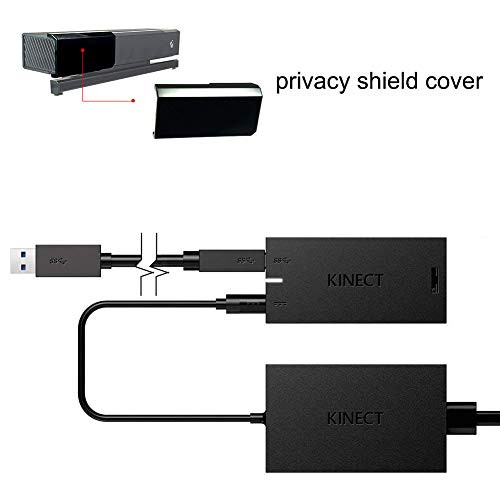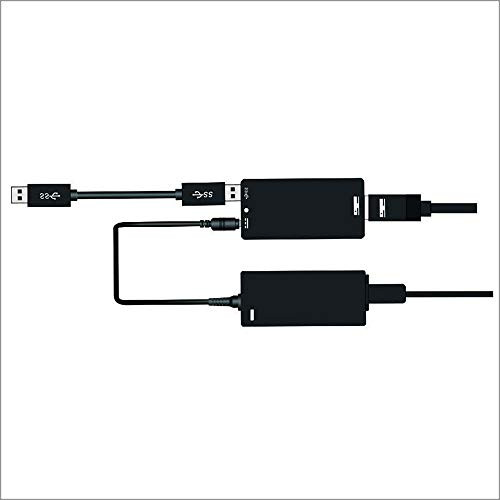
How to set up the Kinect Adapter with an Xbox One S console:
Step 1: Set up the adapter
1. Plug the wall plug into the power supply.
2. Insert the round connector of the power supply into the Kinect hub.
3. Insert the Kinect sensor cable into the Kinect hub.
4. Insert the included USB cable into the Kinect hub.
5. You're now ready to connect the adapter to your console.
Step 2: Connect the adapter to the Xbox One S console
1. Insert the USB 3.0 cable into the left USB port labeled 'Kinect' on the back of the console. Your Kinect sensor is now ready to be set up on your console.
2. For best practice, make sure your Kinect sensor and Kinect Adapter are not sitting directly on top of your console.
3. On your console, scroll left to the Guide and select Settings.
4. Select All settings and scroll down to Kinect & devices.
5. Select Kinect and follow the instructions to set up your sensor.
System Requirements for the Kinect Adapter for Windows :
Requires a Kinect for Windows v2 or Kinect for Xbox One Sensor.
Requires a computer with the following minimum specifications.
64-bit (x64 processor
Dual-core 301-GHz (2 logical cores per physical) or faster processor
Dedicated USB 3.0 controller
4GB RAM
Graphics card that supports DirectX 11
Windows 8,Windows 8.1, Windows 10 or Windows Embedded 8
Step 1: Set up the adapter
1. Plug the wall plug into the power supply.
2. Insert the round connector of the power supply into the Kinect hub.
3. Insert the Kinect sensor cable into the Kinect hub.
4. Insert the included USB cable into the Kinect hub.
5. You're now ready to connect the adapter to your console.
Step 2: Connect the adapter to the Xbox One S console
1. Insert the USB 3.0 cable into the left USB port labeled 'Kinect' on the back of the console. Your Kinect sensor is now ready to be set up on your console.
2. For best practice, make sure your Kinect sensor and Kinect Adapter are not sitting directly on top of your console.
3. On your console, scroll left to the Guide and select Settings.
4. Select All settings and scroll down to Kinect & devices.
5. Select Kinect and follow the instructions to set up your sensor.
System Requirements for the Kinect Adapter for Windows :
Requires a Kinect for Windows v2 or Kinect for Xbox One Sensor.
Requires a computer with the following minimum specifications.
64-bit (x64 processor
Dual-core 301-GHz (2 logical cores per physical) or faster processor
Dedicated USB 3.0 controller
4GB RAM
Graphics card that supports DirectX 11
Windows 8,Windows 8.1, Windows 10 or Windows Embedded 8
![Kinect Adapter for Xbox One S Xbox One X Windows PC [UL Listed] Xbox Kinect Adapter Power Supply for Xbox 1S 1X Kinect 2.0 Sensor, Xbox One Kinect Adapter for PC Windows 10 8.1 8](https://cdn11.bigcommerce.com/s-t8bvbs505h/images/stencil/500x659/products/3388455/3655180/51CmhRlzhnL__70861.1566124797.jpg?c=2 "Kinect Adapter for Xbox One S Xbox One X Windows PC [UL Listed] Xbox Kinect Adapter Power Supply for Xbox 1S 1X Kinect 2.0 Sensor, Xbox One Kinect Adapter for PC Windows 10 8.1 8")


![Womdee [Upgrade] Kinect Adapter for Xbox One S Xbox One X and Windows 8/8.1/10 PC, kinect 2.0 Sensor, USB 3.0](https://cdn11.bigcommerce.com/s-t8bvbs505h/images/stencil/500x659/products/2173756/2253224/41M4pfo2qGL__92413.1558328058.jpg?c=2 "Womdee [Upgrade] Kinect Adapter for Xbox One S Xbox One X and Windows 8/8.1/10 PC, kinect 2.0 Sensor, USB 3.0")