
iPower 19 Inch Basic Gull Wing Reflector 1.Easy set-up, easy work, let your life easygo. 2.Perfect for you to enlarge your grow areaand harvest more! 3.Fits for 250W, 400W, 600W and 1,000W HPS / MH grow light system. Increase the growing area under each lamp by up to 75%. Increase yield per lamp up to 50%. It can help you get a good harvest quickly. 95% reflective proprietary textured German aluminum can intensify light and enlarge lighting area. Twice the power and efficiency of most other reflectors. Specification: Size: 21'' x 17'' x 6'', Light Coverage: 4' x 4', Support up to 1000W HPS / MH grow light system. iPower 7-Day Programmable Digital Timer Feature: Size: 1 Pack. 1. iPower 7-Day Programmable Digital Timer with dual outlets can be easily used indoor only as digital kitchen timer, garden timer and more. 2. The LCD screen is largely displayed with multi-functions and user-friendly. The light timer can control up to 8 groups of ON/OFF switch, random timing mode is available. 3. Several timing combinations can be set such as hourly, daily, weekly and group of the weeks. Settings Automatically Repeat Weekly & Backed up in Case of Power Failure. 4. Daylight Savings Time (DST) Switch: Press HOUR and MINUTE simultaneously to activate or deactivate to standard time. Specification: Length: 3 inches, Width: 2.8 inches, Height: 3 inches, Weight: 8 ounces, Rated Voltage: 125VAC, 15A, 60 Hz, 1/2HP, 1725W. Programming Example: Assume it is 08:05 AM, Monday, and you want to set timer at 8:20AM ~10:40AM on Monday. 1. Reset the timer. 2. Hold CLOCK and press WEEK until Mo shows on the top of the LCD. 3. Hold CLOCK and press HOUR until 8:00 AM shows on the LCD. 4. Hold CLOCK and press MIN until 8:05 AM shows on the LCD. The clock is now correctly set. 5. Press PROG and the LCD displays 1 On. 6. Press WEEK until Mo displays on the upper position of the LCD. 7. Press HOUR until 8:00 displays in the middle and AM displays on the left side. 8. Press MIN until 8:20 displays in the middle and AM displays on the left side. 9. Press RROG and LCD displays 1 Off. 10. Press WEEK until Mo displays on the upper position of the LCD. 11. Press HOUR until 10:00 displays in the middle and AM displays on the left side. 12. Press MIN until 10:40 displays in the middle and AM displays on the left side. 13. Press CLOCK to quit programming and return to clock display. 14. Press ON/OFF/AUTO until Auto is displayed on LCD. 15. Plug the timer into an electrical outlet. 16. Attach an appliance to the timer. Make sure the appliance is switched on. Note: If you plug the timer between 8:20 AM and 10:40 AM, it will not turn on the appliance right away so as to avoid power surge

iPower 19 Inch Basic Gull Wing Reflector and 7 Day Digital Programmable Timer Combo Set for Indoor Gardening White
Was:
$143.88
Now:
$71.94
(No reviews yet)
Write a Review

Write a Review
iPower 19 Inch Basic Gull Wing Reflector and 7 Day Digital Programmable Timer Combo Set for Indoor Gardening White
- SKU:
- O569758
- UPC:
- 840166200742
- Condition:
- New
- Availability:
- Free Shipping from the USA. Estimated 2-4 days delivery.


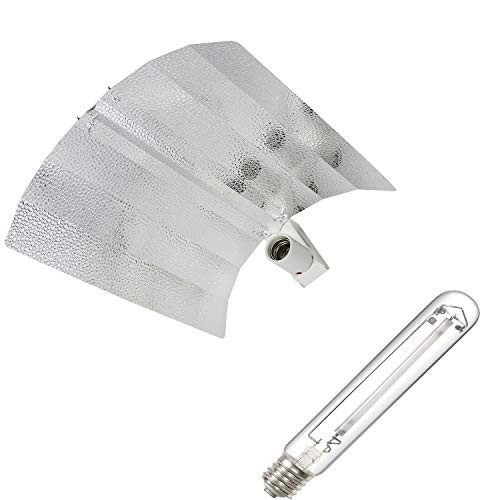

iPower 19 Inch Basic Gull Wing Reflector for HPS MH Grow Light
Was:
$176.90
Now:
$88.45
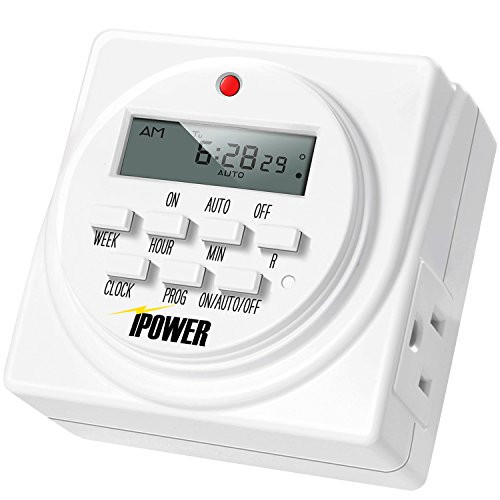
iPower 7 Day Programmable Digital Electric Timer, Dual Outlet, Grounded
Was:
$55.88
Now:
$27.94