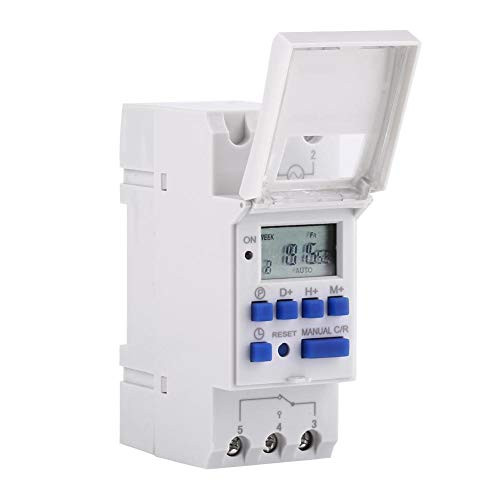
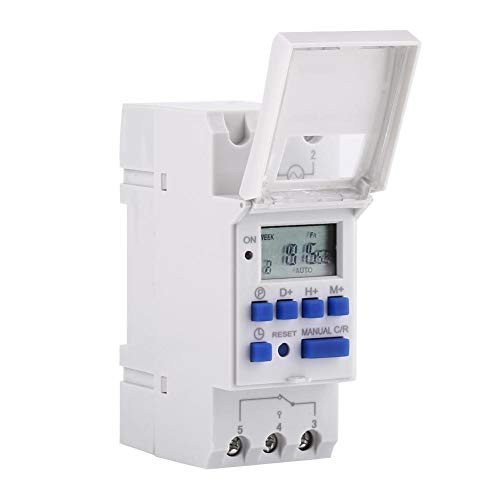
Specifications:
Input voltage: AC/DC12V, AC/DC24V, AC110V, AC220V (optional) Contact voltage: AC 180V to 264V (50/60Hz) Load capacity: 25A 250VAC (ohmic load) On/Off operation: 16 on and 16 off (manual/automatic) Display: LCD Power: 4.5VA (max) Error: ?2s/day (25 ?) Mounting type: DIN rail (not included) Bound: 1 minute to 168 hours Operating temperature: -10 ? to 55 ? Size: 86 x 36 x 65 mm/3.38 x 1.41 x 2.56 " amount: 1
Instruction:
1, When using the timer for the first time, enter AC and please charge the built-in battery, then press the reset button.
2, The timer is in 24 hour mode by default. Press and hold the "Time" button (at the bottom left next to "Reset") for 5 seconds until "AM" is displayed to set the 12 hour mode. Press and hold the "Time" button for 5 seconds to return to 24 hour mode.
Programming: Step
button Programming
1
Press
P
Setting the time "1 ON" (display 1 on) 2
Press
D +
Select the days of the week (if you want the same set for every day, you do not need to press this button)
3
Press
H + /
M +
Set hours and minutes 4
Press
P
Set time "1 OFF" (display 1 off) 5
Press
P
Select the days of the week (if you want the same set for each day, you don't need to press this button)
6
Press
H + /
M +
Set hours and minutes7
Repeat step
2 to 6 Set a different on/off time 8
Press "Time" (bottom left, next to "Reset") end
Package content:
1 x timer 1 x English manual

Ccylez Digital Weekly Timer time Switch LCD Display Digital programmable Timer 25A 250V AC Electronic Relay Timer 16on and 16off Timer time Switch Controller Switch-12V-
Was:
$114.98
Now:
$57.49
(No reviews yet)
Write a Review

Write a Review
Ccylez Digital Weekly Timer time Switch LCD Display Digital programmable Timer 25A 250V AC Electronic Relay Timer 16on and 16off Timer time Switch Controller Switch-12V-
- SKU:
- YTH292181
- UPC:
- 3593539618442
- Condition:
- New
- Availability:
- Free Shipping from the USA. Estimated 2-4 days delivery.