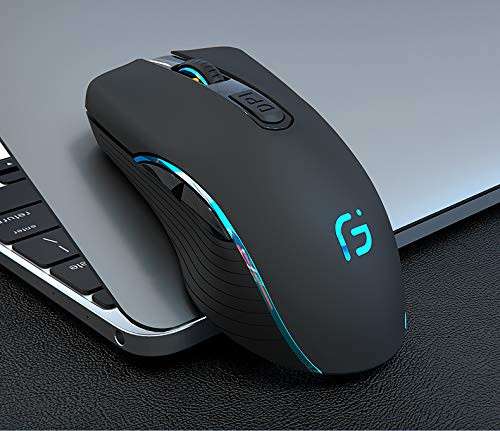
Why Choose MICOKA Rechargeable Wireless Mouse?
-Charging 1 hour to work for more 1 mouths ,so no more need to change battery for your mouse anymore
- With dual mode connection: BLUETOOTH 4.0 and 2.4GHz WIRELESS CONNECTION,It can work on TWO DEVICES, connecting one device through Bluetooth and the other through 2.4GHz USB Receiver. You could switch the mode between two devices by just one click
-3 DPI switches :1000, 1200, 1600
How to use it:
-Power switch at the bottom of the mouse.
-Turn it to right is 2.4G mode,it will has 2 seconds green light on then off.
-Turn it to left is Bluetooth mode,it will has 2 seconds blue light on then off.
A. 2.4Ghz mode
?Remove the wireless adapter
? Insert the computer USB
?Wait for 3 seconds,then turn the power button to right.
B. Bluetooth mode
? Turn on the device's Bluetooth function (You do not need to plug the wireless adapter into your computer when using Bluetooth mode.)
?Mouse in Bluetooth mode, press the Bluetooth connect button until the blue light flash (2-3 seconds)
? Search the product of Bluetooth, the name is (BLUETOOTH MOUSE 4.0)
?Click on the pairing for Bluetooth connection, to be connected successfully, you can use this product's Bluetooth mode.
Products Specification:
Size:112*57*20MM
Weight : 54g
DPI: 1000 1200 1600 DPi
Voltage: 5V
working distance: 33ft/10m
Compatiable with :
Windows 10 / 8 / 7 / XP / Me / 2000/Vista and Mac OS. You can use this wireless mouse for Laptop, PC Notebook, Tablet, Computer and Macbook.
What you get:
1 x Rechargeable wireless mouse.
1 x USB receiver. (stored in the back of the mouse)
1 xUser Manual .
1 x Micro USB to USB charging cable.
Warm Note:
The receiver is stored in the bottom of the mouse.

Bluetooth and 2 4GHz Rechargeable Wireless Mouse Dual Mode Slim Mute Silent Click Noiseless Optical Mouse with USB Receiver Compatible with MacBook Notebook PC Laptop Desktop Computer
Was:
$85.88
Now:
$42.94
(No reviews yet)
Write a Review

Write a Review
Bluetooth and 2 4GHz Rechargeable Wireless Mouse Dual Mode Slim Mute Silent Click Noiseless Optical Mouse with USB Receiver Compatible with MacBook Notebook PC Laptop Desktop Computer
- SKU:
- O136294
- UPC:
- 699921992688
- Condition:
- New
- Availability:
- Free Shipping from the USA. Estimated 2-4 days delivery.