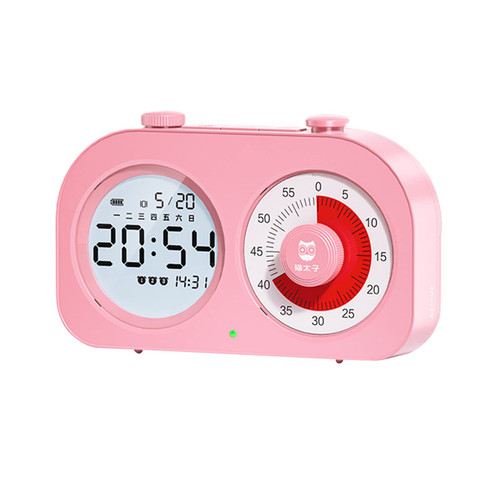
AIMILAR Digital Alarm Clock with Count-up / Countdown Timer
Key Features:
- Clock Function (12 or 24 hours format )
- Alarm Clock with Snooze Function
- Timer Function (Count up + Count down?
- In timer mode, you can choose 99 hrs 59 mins or 99 mins 59 secs.
- Memory Function
- Large Display
- With Backlight
- Power: 2*AAA batteries (included)
How to set Count-down?
1. Press "MODE" button to switch to the timer mode: 00H00M or 00M00S.
2. In timer mode (00H00M), press "HOUR"/ "MIN" to set the hour/minute value.
In timer mode (00M00S), press "HOUR"/ "MIN" to set the minute/second value.
3. Press "SNOOZE/LIGHT" button to start/pause the timer.
4. When the time is up, press any button to stop the alarm, and it will show the last time setting (Memory Function).
How to set Count-up?
1. Press "MODE" button to switch to the timer mode: 00H00M or 00M00S.
2. Press "SNOOZE/LIGHT" button to pause the timer.
3. Hold "SNOOZE/LIGHT" button to reset to 0.
4. Press "SNOOZE/LIGHT" button to start the timer.
How to set Clock & Alarm?
1. Hold "MODE" button until you see a number start flashing.
2. Push "MODE" button until you get to the number you want to change. (Hour-Minute-Alarm hour-Alarm minute)
3. Press "HOUR" or "MIN" to increase or decrease that particular number.
4. Keep hitting "MODE" until the screen stops flashing.
Note:
1. Press "ALARM" button to turn on/off the alarm.
2. Hold the "ALARM" button to switch between 12 or 24 hours format.

AIMILAR Multi-Functional Digital Timer Clock - Large Display with Snooze Alarm, Countdown & Count-up Timer for Kids & Adults, Soft Backlight for Nighttime Use. Ideal for Bedroom, Kitchen and Office
Was:
$79.88
Now:
$39.94
(No reviews yet)
Write a Review

Write a Review
AIMILAR Multi-Functional Digital Timer Clock - Large Display with Snooze Alarm, Countdown & Count-up Timer for Kids & Adults, Soft Backlight for Nighttime Use. Ideal for Bedroom, Kitchen and Office
- SKU:
- ZDS79749
- UPC:
- 5060889370552
- Condition:
- New
- Availability:
- Free Shipping from the USA. Estimated 2-4 days delivery.