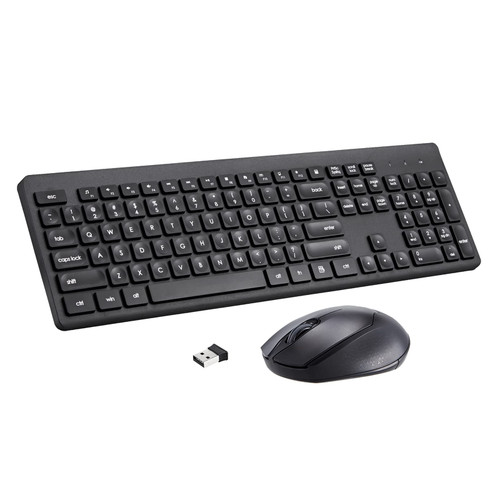
Specifications:
Connection Mode: 2.4GHz
Keyboard Dimensions: 17 x 5.24 x 0.94 inchs
Keyboard Weight: 1.03 pounds
Mouse Dimensions: 3.94 x 2.4 x 1.5 inchs
Mouse Weight: 1.66 ounces
Operating Range: Up to 33 ft / 10 meters
Keys Number of Keyboard: 106 Keys
Mouse DPI Level: 1600 DPI
Shortcut Keys Number: 12 Keys
Keyboard Battery: 1 x AAA (Not included)
Mouse Battery: 1 x AA (Not included)
How to connect keyboard and mouse:
1: Open the mouse battery cover and take out the USB receiver
2: Then insert it into the USB port of the computer, and insert 1 AAA battery to the keyboard, insert 1 AA battery to the mouse, and you're ready to use.
Package Included:
1x Wireless Keyboard
1x Wireless Mouse
1x USB Receiver
1x User Manual
Warranty: 18 months warranty, and our friendly customer service.
Q&A
2 in 1 USB Receiver
Both wireless keyboard and mice share the same USB receiver, saving your USB port.
Where is the USB receiver?
The USB receiver is in the mouse, you can find it when you open the mouse's battery cover. When you don't use it, you can plug the Nano receiver into the USB storage slot again, so you don't lose the USB.
Some keys or Mouse are not working, what to do?
Make sure the USB receiver is connected directly to your computer. Or unplug the USB receiver, remove the battery, and reinsert the USB receiver and battery.
Connectivity and USB troubleshooting
Restart your computer and make sure the mouse & keyboard are turned on and not too far away from the USB Receiver.
My NumPad/ KeyPad is not working, what should I do?
Ensure that the NumLock key is enabled.

2.4 GHz Wireless Keyboard and Mouse Combo, Full-Sized USB Cordless Mouse Keyboard Set Silent for PC Laptop Computer Desktop Windows Mac Chromebook, Numeric Keypad & Compact Optical Mouse (Black)
Was:
$83.88
Now:
$41.94
(No reviews yet)
Write a Review

Write a Review
2.4 GHz Wireless Keyboard and Mouse Combo, Full-Sized USB Cordless Mouse Keyboard Set Silent for PC Laptop Computer Desktop Windows Mac Chromebook, Numeric Keypad & Compact Optical Mouse (Black)
- SKU:
- ZD820822
- UPC:
- 738086220776
- Condition:
- New
- Availability:
- Free Shipping from the USA. Estimated 2-4 days delivery.