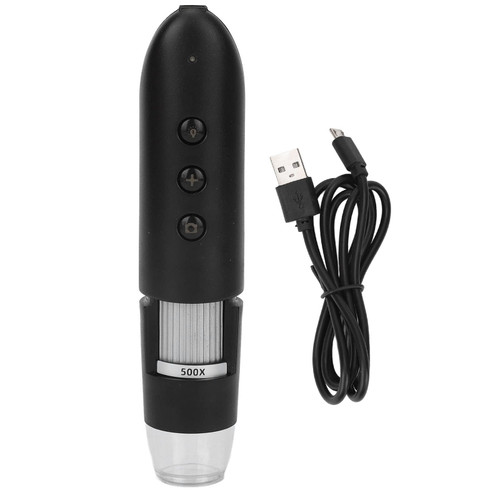
[DIAGNOSE SCALP] - Suitable for beauty salons, hair salons, and beauty chain agencies. Provides an understanding of scalp, hair, and follicle conditions.
[PROFESSIONAL] - Analyzes hair health and damage. Offers correct improvement measures and corresponding products.
[SMART WIFI] - Compatible with mobile phones. Convenient installation of the microscope companion app.
[PORTABLE MICROSCOPE] - Lightweight and compact for easy travel. Can be used anytime, anywhere.
[MULTI-PURPOSE] - Not only a scalp detector but also useful for porcelain antiques, stamps and , and quality inspection circuits.
Spec:
Item Type: Scalp Detector
Material: ABS
Magnification: 500X
Photo or Video: support
Auxiliary Light Source: white LED light source
Static resolution: 1600x1200 (interpolation of 2 million)
Image resolution: 1600x1200 (interpolation of 2 million)
Support system: for Android 4.0 or above, for IOS8.0 or above
Built in battery type: lithium battery
Battery capacity: 1400mAh
Charging time: 5 hours
Working time: 2.5 hours
Body Size: Approx.
Length: 160mm / 6.3in, Outer Diameter: 33mm / 1.3in
Package List:
1 x Scalp Detector
1 x USB Charger
How To Use:
Instructions:
1. Use WIFI digital microscope on your mobile device.
2. Download the APP.
Search UMWCAM in app store, download and install.
3. Turn on the device, press and hold the switch button for 5 seconds to turn on the device, and release the button when the front headlight light up. After 10 seconds, the WIFI function will start when the green indicator light flashes.
4. Connect the WIFI digital microscope to your mobile device. Open the WIFI settings, find a WIFI hotspot named UMWCAM (without encryption), and click to connect. After the connection is successful, it will return to the main interface of the mobile device. Find the installed UMWCAM APP and
[PROFESSIONAL] - Analyzes hair health and damage. Offers correct improvement measures and corresponding products.
[SMART WIFI] - Compatible with mobile phones. Convenient installation of the microscope companion app.
[PORTABLE MICROSCOPE] - Lightweight and compact for easy travel. Can be used anytime, anywhere.
[MULTI-PURPOSE] - Not only a scalp detector but also useful for porcelain antiques, stamps and , and quality inspection circuits.
Spec:
Item Type: Scalp Detector
Material: ABS
Magnification: 500X
Photo or Video: support
Auxiliary Light Source: white LED light source
Static resolution: 1600x1200 (interpolation of 2 million)
Image resolution: 1600x1200 (interpolation of 2 million)
Support system: for Android 4.0 or above, for IOS8.0 or above
Built in battery type: lithium battery
Battery capacity: 1400mAh
Charging time: 5 hours
Working time: 2.5 hours
Body Size: Approx.
Length: 160mm / 6.3in, Outer Diameter: 33mm / 1.3in
Package List:
1 x Scalp Detector
1 x USB Charger
How To Use:
Instructions:
1. Use WIFI digital microscope on your mobile device.
2. Download the APP.
Search UMWCAM in app store, download and install.
3. Turn on the device, press and hold the switch button for 5 seconds to turn on the device, and release the button when the front headlight light up. After 10 seconds, the WIFI function will start when the green indicator light flashes.
4. Connect the WIFI digital microscope to your mobile device. Open the WIFI settings, find a WIFI hotspot named UMWCAM (without encryption), and click to connect. After the connection is successful, it will return to the main interface of the mobile device. Find the installed UMWCAM APP and