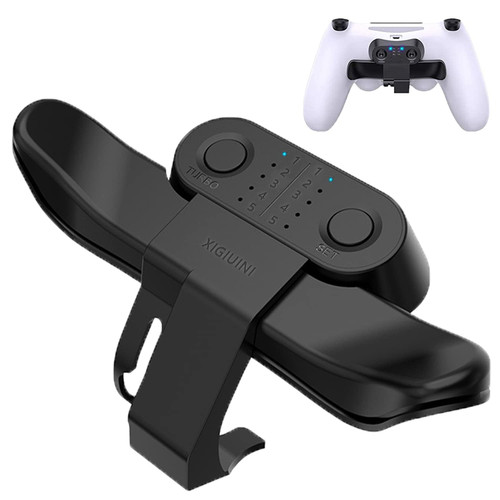
Color: Black
Size: 99.5x57mm
Programming function settings:
1. Long press the SET button for 2 seconds, ? the corresponding LED flashes quickly (4HZ), then short press the M1 or M2
button, the LED lights will flash slowly on the screen of the corresponding function (lighting sequence is ?, ?, ?, ? , R3, L3, R2, L2, R1, L1).
2. Then press the SET button, the corresponding function will be mapped to M1/2; for example: when entering the
programming mode, press the M1 button to display the LED on R1, and then press the SET button, the LED on R1 Turns to
long light, M1 function is R1; when programming M2, it is similar to the above. 10 LEDs are used as key function indicators
to indicate the function of the programming keys, and up to 2 LED lights are displayed.
Turbo function settings:
1. Press and hold the function button and Turbo button at the same time, the function button has Turbo burst function;
2. Press the above key combination again to cancel the Turbo function of the key. If the Turbo function is set, after pressing
the button, the LED corresponding to the function flashes quickly (4HZ).
Packing list:
1 x Back Button Attachment
1 x User Manual

Paddles for PS4 Controller, Controller Back Button Attachment,With Turbo Key Adapter For PS4 Game Controller Accessories
Was:
$65.70
Now:
$32.85
(No reviews yet)
Write a Review

Write a Review
Paddles for PS4 Controller, Controller Back Button Attachment,With Turbo Key Adapter For PS4 Game Controller Accessories
- SKU:
- ZC554580
- UPC:
- 793207586285
- Condition:
- New
- Availability:
- Free Shipping from the USA. Estimated 2-4 days delivery.